
WhatsitAI: ID & Value Anything
WhatsitAI IncShopping
4.5195.00 Reviews
- Version
- 2.1.1
- Installs
- 50.00K
- Age Rating
- Everyone
Screenshots

Our Review of WhatsitAI: ID & Value Anything
 Analysis by Appyee
When I’m deciding whether to use an app that points a camera at my belongings and assigns them a value, I want to separate convenience from trust. WhatsitAI: ID & Value Anything is a free shopping app from WhatsitAI Inc, and its central appeal is quick object identification paired with an estimated price. That can be useful when I’m curious about a thrift-store find, but a camera-based estimate is a starting point for research, not proof of authenticity or a promise of what an item will sell for.
The app has a 4.6 average from around 931 ratings, and it has passed 50,000 installs. Those figures suggest that plenty of people are willing to try it, but popularity alone can’t tell me whether a particular valuation is dependable. I’d treat the result as one clue, then check details such as maker, condition, age, and comparable listings before making a purchase or setting a selling price.
What I would check before trusting an estimate
AI recognition can make an unfamiliar object easier to investigate, especially when I don’t know the right search terms. The important distinction is between identifying a broad type of item and establishing the exact object in front of me. Two lamps can look alike in a photo but differ in maker, materials, age, or condition, and those differences may matter far more to a buyer than a general visual match.
For that reason, I’d use the app to generate a lead rather than a final answer. If it identifies a collectible, I’d look for labels, signatures, model numbers, or other details that a picture may not capture. A second photo showing the underside or a close-up of a mark can help me search more precisely, even if the app’s initial result looks convincing.
Trust, permissions, and personal choice
With any camera-based shopping tool, I think about what I’m choosing to photograph and share. A picture of a secondhand vase is different from an image that also reveals a home address, family photographs, paperwork, or other private details in the background. I’d frame the object tightly and review the image before submitting it, especially when I’m testing the app in a room with personal items nearby.
I also wouldn’t assume that an estimated value explains how a result was produced. When money is involved, I want to know whether the comparison is based on actual completed sales, asking prices, or a broader estimate; those are not interchangeable. If I can’t verify the basis for a number, I’d avoid treating it as a firm valuation and would compare it with more than one source before spending or selling.
Where it fits in a careful shopping routine
WhatsitAI is best viewed as a quick first stop between spotting something interesting and doing deeper research. It may help me name an object when I’m browsing, but a dedicated marketplace search is better for checking current asking prices, while a specialist appraiser or knowledgeable dealer is a better choice for a high-value or authentication-sensitive item. Each option answers a different question: recognition, market comparison, or expert verification.
That distinction matters at a yard sale. If I see a box of old books, I could use an identification result to decide which titles deserve a closer look, then inspect publication details and compare copies in similar condition. I wouldn’t buy a book just because an app suggests a high figure; missing dust jackets, damage, edition differences, and local demand can change what someone will actually pay.
Who should use it—and who should pause
I can see the app appealing to curious shoppers, casual resellers, and people sorting household items who want a quick way to identify things they don’t recognize. It is less suitable as the only source for insurance documentation, estate decisions, authentication, or a sale where a mistaken estimate could cost a meaningful amount. In those situations, careful records and a qualified human opinion are more valuable than speed.
The app is free to download, but it includes in-app purchases ranging from $1.99 to $99.99 per item. I’d check the purchase prompt and its terms before confirming anything, and consider whether I actually need a paid option for the task at hand. Its Everyone age rating makes it broadly accessible, but that does not mean every estimate is appropriate to rely on for a financial decision.
The release date is October 14, 2024, and the current version is 2.1.1, with Android 6.0 as the minimum operating-system requirement. Those details help set expectations about compatibility, but they don’t settle questions about privacy or valuation quality. I’d make those decisions based on the choices the app visibly presents and the care I take with each photo and result.
Ever stumbled upon an object and wondered what it was or how much it might be worth? Enter WhatsitAI: ID & Value Anything, the app that wants to be your go-to tool for identifying and valuing just about anything you can think of. I had the chance to dive into this app, and I’ve got a lot to share with you about it.
First Impressions and Features
When I first opened WhatsitAI: ID & Value Anything, I was immediately greeted by a sleek and intuitive interface. It’s one of those apps where you don’t need a manual to get started. You can jump right in and start exploring. The app promises to identify objects and provide their estimated value, and it supports a wide range of categories from antiques to everyday gadgets.
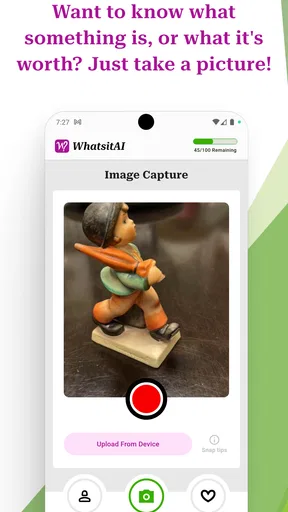
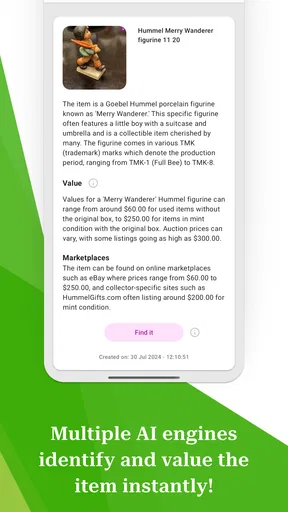
The main feature is the camera tool. You can snap a picture of an object, and the app uses AI to identify what it is. I decided to test it out with a few random items around my house. A vintage lamp, an old coin, and a modern phone. I was pleasantly surprised by how quickly the app identified each item and provided a brief description along with an estimated value. It was like having a pocket expert in antiques and collectibles!
Usability and Design
One thing that really stood out to me was the app’s usability. The design is refreshingly simple, with everything laid out in a way that makes sense. The developers have clearly put a lot of thought into user experience. There are no unnecessary buttons or confusing menus. Just point, shoot, and get your info.
Navigation is a breeze. Whether you’re a tech-savvy teenager or someone who struggles with smartphones, you’ll find this app easy to use. The clean design extends to the settings, where you can tweak things like notification preferences and language settings.
Behind the AI Magic
Let’s talk about the AI for a moment. The app’s ability to recognize objects is impressive, and it seems to improve with each use. It uses a vast database that’s constantly updated to ensure accuracy. During my test, it correctly identified a rare book I had on my shelf, something even I wasn’t expecting.
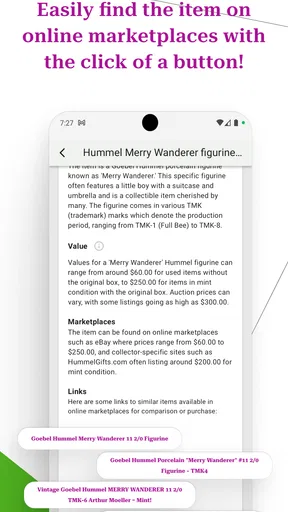
The valuation feature is equally fascinating. It provides a range of estimated values based on recent market trends and data sources. While it’s not always 100% accurate, it gives you a ballpark figure that’s useful for anyone curious about their belongings' worth.
Real-Life Applications
So, who would benefit most from WhatsitAI? Well, pretty much everyone. Collectors, bargain hunters, and even casual users might find it handy. Imagine being at a garage sale and using the app to quickly check if an item is a hidden gem or just junk. Or maybe you’re a parent trying to figure out if that dusty toy in the attic is worth keeping.
The app also offers a social component, allowing users to share their findings with friends or even a global community. It adds a layer of fun, as you can see what others have discovered and how much those items are valued at.
Making a result more useful
I find the camera feature most useful when I treat a result as a prompt for a closer inspection. In a shop, I’d take a clear photo of one item at a time, then check whether the suggested identification matches visible details such as a brand mark, label, or model number. If the photo includes several objects, the most prominent one may draw attention away from the item I actually want to identify.
For selling, I’d use the estimate to decide what research to do next, not to set a non-negotiable asking price. A practical workflow is to note the suggested item name, inspect its condition, and search for comparable examples with the same features. Asking prices can be optimistic, while completed sales are a better guide to what buyers have paid. If the item is unusual or valuable, a second opinion is worth the time.
For household sorting, the app can help me prioritize. I might photograph a mixed box of objects one by one, set aside anything that appears collectible, and then verify those candidates before donating or listing them. That approach is more sensible than assuming every old object has resale value; the cost of researching an ordinary item can quickly outweigh what it might bring.
Questions I’d keep in mind
Would I use it to identify an item I’ve never seen before? Yes, as a way to get a useful search phrase or a first description. Would I rely on it to authenticate a rare coin or antique? No—not without examining the object and checking with a specialist. The photo may help narrow the possibilities, but visual similarity is not the same as proof of origin.
Would I use the estimate to decide whether to buy something on the spot? Only for a low-stakes purchase, and only after checking the item’s condition and looking for comparable prices. A quick estimate can keep me from overlooking an interesting find, but it can also create false confidence if I mistake a broad category for a precise match.
Would I recommend it to someone who wants a full inventory or formal valuation of a collection? I’d suggest comparing the app with tools designed for record keeping or getting professional help, depending on the purpose. WhatsitAI’s strongest appeal is immediate identification and a rough sense of value, not replacing careful documentation or expert appraisal.
Final Thoughts
In a world where we’re constantly surrounded by objects of unknown origin and value, WhatsitAI: ID & Value Anything is a breath of fresh air. It’s a handy tool that not only educates but also entertains. Sure, it might not always hit the mark with valuations, but the convenience and curiosity it caters to make it worth a try.
If you’ve ever found yourself pondering the history or value of something in your possession, give WhatsitAI a shot. It’s like having a personal appraiser in your pocket, ready to answer your questions at the tap of a button. You might just be surprised by what you discover.
Verdict
Strengths of WhatsitAI: ID & Value Anything
- Accurate object identification.
- Fast and responsive interface.
- Wide range of item categories.
- Integrates with other apps.
- Regular updates enhance features.
Limitations of WhatsitAI: ID & Value Anything
- Occasional misidentification issues.
- Requires stable internet connection.
- No offline mode available.
- Limited free version features.
- Battery consumption can be high.
Similar Picks in This Category
View All
SHEIN-Shopping Online
Roadget Business PTE. LTD.4.8

Amazon Shopping
Amazon Mobile LLC4.4


Mercado Libre: Compras online
Mercado Libre4.8

Wish: Shop and Save
Wish US Holdings LLC4.7

Alibaba.com - B2B marketplace
Alibaba Mobile4.4
Frequently Asked Questions
What is WhatsitAI: ID & Value Anything?
WhatsitAI: ID & Value Anything is a cutting-edge app designed to help users identify and evaluate items using advanced image recognition technology. Whether you're curious about an antique, a piece of art, or a rare collectible, this app provides instant insights and potential valuations, making it a handy tool for collectors and enthusiasts alike.
How accurate is the identification and valuation provided by WhatsitAI?
WhatsitAI leverages a robust AI-powered algorithm that continuously learns from a vast database of items. While it aims to provide accurate identifications and valuations, the app's accuracy can vary based on the image quality and item rarity. Users are encouraged to use the results as a guideline and seek professional appraisals for high-value items.
Can WhatsitAI handle items from any category?
Yes, WhatsitAI is designed to be versatile, covering a wide range of categories, including antiques, electronics, fashion items, and more. Its extensive database allows it to recognize and evaluate items from diverse sectors, providing users with comprehensive insights regardless of the item category.
Is WhatsitAI free to use, or does it require a subscription?
WhatsitAI offers a free version with limited features, allowing users to test its capabilities. For a more comprehensive experience, including unlimited item evaluations and enhanced database access, users can opt for a premium subscription. This ensures users get the most value and accuracy from their identifications and valuations.
What personal data does WhatsitAI collect and how is it used?
WhatsitAI prioritizes user privacy, collecting minimal data necessary for functionality. Images submitted for identification are processed securely and are not stored beyond the evaluation process. Any additional data collected is used to improve app performance and user experience, adhering to strict privacy policies and guidelines.
